Explain how buildings and structures work in 3D video
Once a structure is complete, its strength and construction techniques are hidden inside walls and ground. Attach design documents, construction method descriptions, or drawings, and the AI uses the facts in them to put together a video that shows how the structure works and the construction sequence in 3D.
Who it's for
- People who want to explain their company's methods or technology to clients and business partners
- Anyone who wants to explain construction work at resident meetings or site tours
- For engineers who want to show structural ingenuity in technical proposals
- Communications staff who want to introduce the role of infrastructure to the general public
Common challenges
The structure can't be seen once it's finished
Foundations, seismic isolation devices, rebar, and piping end up hidden inside walls and underground once construction is done. Photos taken during construction alone make it hard to show the role each part plays in the whole.
Drawings are hard to read unless you're an expert
Floor plans and cross-sections are hard to read for owners and residents who aren't used to them. At briefings, you end up going back and forth between spoken explanations and drawings.
The order of construction is hard to picture
In what order is each part built, and when and where does temporary equipment go in? The longer a construction project runs, the fewer ways there are to show the whole flow from groundbreaking to completion at once.
What 3DCG Video AI can do
Structure and construction method laid out from your materials
Attach design explanations, construction method brochures, or specifications, and the AI uses only the numbers and facts in them to put the structure's mechanism and construction sequence into a storyboard. Always check the numbers and wording in the storyboard and the finished video.
Show hidden structures in 3D
The AI builds 3D models of buildings, bridges, and ground, shows the flow of forces with arrows, and shows how shaking travels through motion. The camera can circle around to reveal the internal structure step by step.
Attach drawings and 3D models
You can attach drawings (DXF) and 3D models exported from other software (glTF, OBJ, STL, and more). 3D models keep their exact shape in the video. DWG drawings can be read as they are, but we recommend exporting to DXF before attaching.
Easy to watch at briefings, too
Captions follow the narration, so viewers can keep up even in a large venue or a place where it's hard to hear. Choose 16:9 for venue screens, or 9:16 or 1:1 for web announcements.
Examples of videos you can make
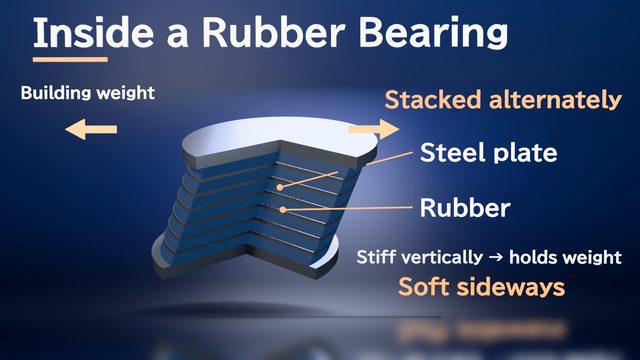
- How base isolation keeps a building from feeling the shaking
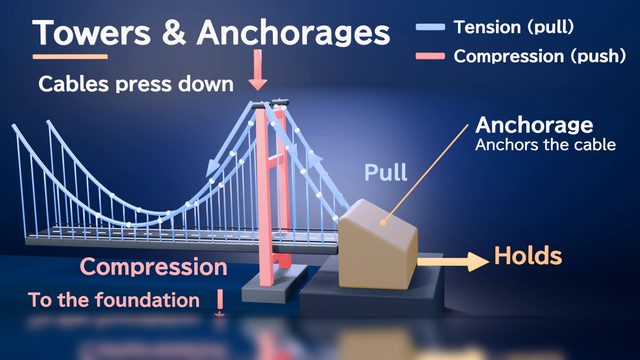
- How the cables, towers, and anchorages of a suspension bridge carry the load
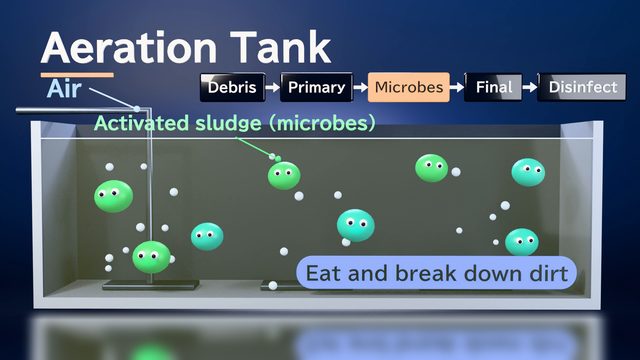
- How water becomes clean at a sewage treatment plant
- The order for building underground structures with a new construction method
- For resident meetings: the construction steps and what it will look like when finished
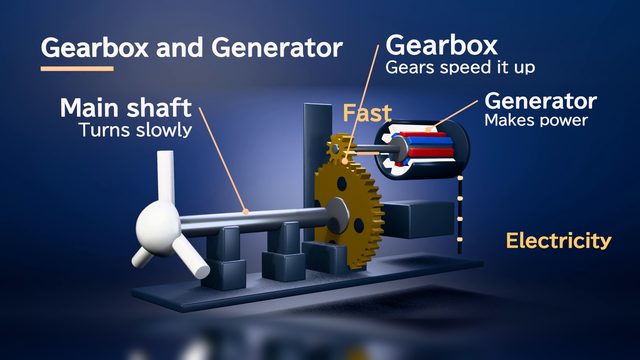
- How a wind power facility is built, and how the electricity reaches you
Sample videos similar to this use case
Tips for better results
For explanations aimed at the general public, use fewer technical terms and start with "what the structure is for." Drawings alone don't convey height, depth, or materials well, so also attach an explanatory document that lists the main dimensions and the order of work. For construction explanations, we recommend showing the finished result first, then walking through the construction steps. For a briefing session, aim for 3–5 minutes; for a web announcement, around 1 minutes. For plans that aren't public yet, check what you're allowed to share before using them.
Example chat requests
Using the attached design overview and drawings, create a 3-minute video to play at a residents' meeting. First show the finished building, then explain the roles of the foundation and the seismic isolation devices in 3D so people can see how shaking travels. Avoid technical terms as much as possible.
Price estimates
In Standard mode, one 1-minute video with 2 small revisions costs about 3,500 credits (1 credit = $0.01). High Quality mode costs about 7,100 to 12,000 credits. There's no monthly fee, and before each run we show you an estimate and a cap on the credits to be used.
Typical costs of 3D explainer videos (compared with production companies) · Pricing
FAQ
Can I use DWG drawings or BIM data?
DWG drawings can be used too, but tables and some shapes may not load, and hidden layers also show up in the drawing, so we recommend exporting to DXF and attaching that. 3D models from BIM and similar software can be attached if you export them to a supported format such as glTF/GLB, OBJ, STL, or STEP, and the shape is used as is in the video. Up to 30 MB per file.
Can you make a video of a structure that is still being planned and isn't built yet?
Yes. Based on design documents, drawings, or 3D models, the AI builds the shapes in 3D. Parts with little source material may end up simplified. We recommend gathering materials for the parts you want to show.
Is it also suitable for videos for the general public, such as resident meetings?
Yes, it works well for this. If you ask for something like "without technical jargon," the narration script's wording is adjusted to match. Captions are included too, so viewers can follow along even in a large venue. Be sure to check expressions such as construction periods and figures before you publish.
Can you show the construction sequence step by step, from groundbreaking to completion?
Yes. Attach a schedule or construction procedure document and ask for "in order, from groundbreaking to completion," and the AI splits it into scenes by stage and writes a storyboard. Dates and durations come only from your materials. For long projects, focusing on the main stages makes the video easier to follow.
3D animations for architecture and civil engineering, from your documents and chat
Just attach your materials and tell the AI in chat what video you want. The AI plans a storyboard, builds 3D visuals, and makes a video with narration and captions.