Turn training and manuals into 3D animations that show how things work
With text and photos alone, training materials often fail to explain why a procedure is done a certain way. Attach a manual or inspection procedure, and the AI writes a storyboard that shows the movement inside your equipment and the order of the work in 3D, then turns it into a video with narration and captions.
Who it's for
- For people who create onboarding or skills training materials
- For anyone who wants to show maintenance and inspection procedures consistently on video
- Site managers who want to supplement paper manuals with video
- For those who want to show customers how to use and maintain equipment
Common challenges
The reasons behind the steps don't come across
Even when the steps are written in the manual, not knowing what's happening inside can lead people to skip steps or do them out of order.
You can't film what happens inside
You can't open up the inside of pumps, valves, or heat exchangers to film them while they're running. Live-action manual videos can only show work that's visible from the outside.
Explanations vary depending on who teaches
When you rely on a veteran's spoken explanations, the content varies from instructor to instructor and site to site. The burden of repeating the same explanation over and over also stays with the person teaching.
What 3DCG Video AI can do
Structured in order from your procedure manual
Attach a Word, PDF, or PowerPoint procedure manual or inspection sheet, and the AI uses only the steps and numbers in your document to put together a storyboard with how to show each scene and the narration script. You can check for missing steps and the order of steps at the storyboard stage.
See inside in 3D
The AI builds a 3D model of your equipment and uses camera work to show, in order, the water and air flowing through it, the movement of parts, and the spots that need attention. It can explain not only the work visible from outside but also what happens inside during that work.
The same explanation, the same way, every time
The MP4 comes with narration and captions, so you can show the same content anytime, even when instructors or sites change. When procedures are revised, attach the new materials and rebuild from the storyboard.
For the training room or the field
Choose 16:9 to play on a training room screen, or 9:16 to watch on a smartphone in the field. Captions follow the narration, so people can follow along even where it's hard to play sound.
Examples of videos you can make
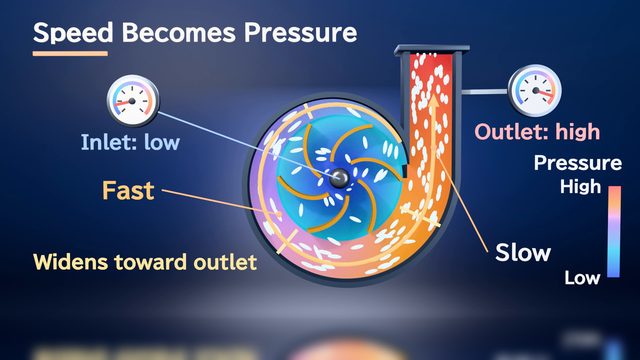
- Why a centrifugal pump needs priming, and what to check before starting
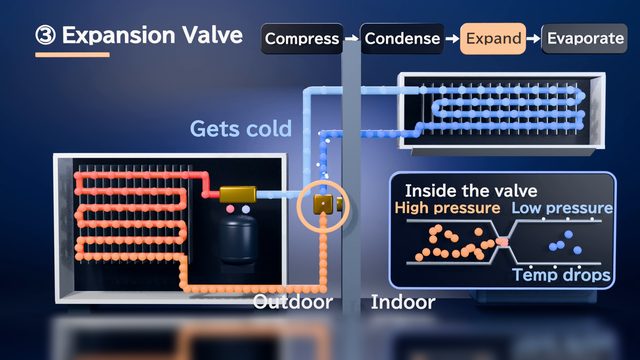
- How refrigerant flows in an air conditioner, and what to check during inspection
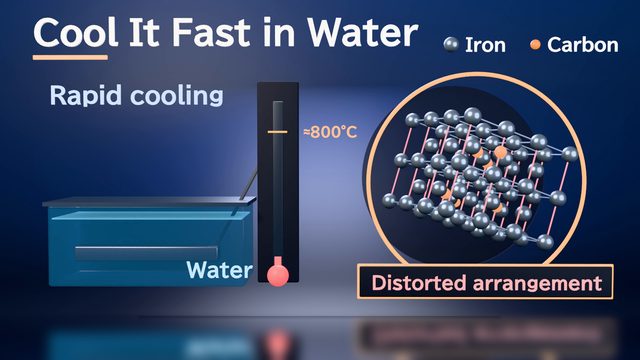
- Why temperature control matters in quenching and tempering
- How safety devices work, and why they must never be disabled
- A video for new hires to learn the names and roles of factory equipment
- Filter replacement steps and precautions for customers (9:16)
Sample videos similar to this use case
Tips for better results
Training videos are easier to rewatch when each video stays focused on 1 topic and runs 3–5 minutes at most. Long procedures work best split into parts, such as preparation, the work itself, and cleanup. If your procedure document also includes the reason and cautions for each step, the narration can explain why each step is done. If your company uses its own terms or abbreviations, mention them in the chat. For safety-related procedures, always have the person responsible on site check the storyboard and the finished video before using them.
Example chat requests
Using the attached inspection procedures, create a 3-minute training video for new maintenance staff. First show in 3D how the impeller turns inside the pump, then explain the inspection steps in order. Also show the cautions as on-screen text.
Price estimates
In Standard mode, one 1-minute video with 2 small revisions costs about 3,500 credits (1 credit = $0.01). High Quality mode costs about 7,100 to 12,000 credits. There's no monthly fee, and before each run we show you an estimate and a cap on the credits to be used.
Typical costs of 3D explainer videos (compared with production companies) · Pricing
FAQ
Can I attach our internal manuals as they are?
You can attach PDF, Word, PowerPoint, Excel, images, and text. Files can be up to 30 MB each, and the materials the AI reads can total up to 20 MB per video. If many pages have nothing to do with the training topic, using only the parts you need makes the structure easier to pull together.
Can you turn a long training course into one video?
You can choose a length from 15 sec to 10 min. However, to help viewers stay focused and to make it easier to keep up with procedure revisions, we recommend splitting the content into videos of a few minutes each, one per topic. Each video you split off is built from its own storyboard.
Can the video be revised if the procedure is updated?
Yes. Attach the revised procedure manual and tell us what changed in the chat, and we can rebuild from the storyboard. Attachments and deliverables are automatically deleted after 30 days, so if you revise later, attach your materials again.
How can I verify the accuracy of safety-related procedures?
The AI aims to use only the steps and numbers in your materials, but errors are possible. Check the order of steps and the numbers in the storyboard, and have the person in charge on site review the finished video before you use it. You can tell the AI what to change in chat.
3D animations for training and manuals, from your documents and chat
Just attach your materials and tell the AI in chat what video you want. The AI plans a storyboard, builds 3D visuals, and makes a video with narration and captions.