Explain how a business or policy works with 3D diagrams and graphs
Business structures and internal policies tend to end up as text-heavy documents, and just reading them doesn't make the flow clear. Attach a business plan or policy document, and the AI turns the numbers and facts in it into a video that shows the connections and sequence with 3D diagrams and graphs.
Who it's for
- People who want to communicate management policy or business plans clearly within the company
- HR staff explaining changes to HR policies or employee benefits to employees
- For people who want new team members to learn the workflow
- Anyone who wants to introduce how their business works at company briefings or on a recruiting page
- For salespeople who need to explain how their service works to clients
Common challenges
Your materials don't get read to the end
Materials on policy changes and business plans are full of text and tables, and people don't always read them to the end. Even if you hold a briefing, it doesn't reach the people who couldn't attend.
The connections don't fit in a single diagram
Where money, people, and goods flow from and to, and what moves between departments and business partners. The more relationships there are, the more complicated a flat diagram becomes.
Explaining numbers gets monotonous
Even if you line up sales or headcount trends in a table, the size of the change and the reasons behind it are hard to get across. Even when you make charts, the explanation tends to become just reading the slides aloud.
What 3DCG Video AI can do
Built only from the numbers and facts in your materials
Attach a business plan, policy documents, or Excel or CSV figures, and the AI uses only the numbers and facts in them to put the narration script and how each scene looks into a storyboard. It doesn't write anything that isn't in your documents.
Flows and connections, shown in 3D diagrams
The AI turns departments, business partners, and the flow of money and goods into 3D diagrams, shown in order with arrows and camera work. Text and numbers are also drawn inside the 3D scene, so they stay clean and clear.
Show numbers with charts
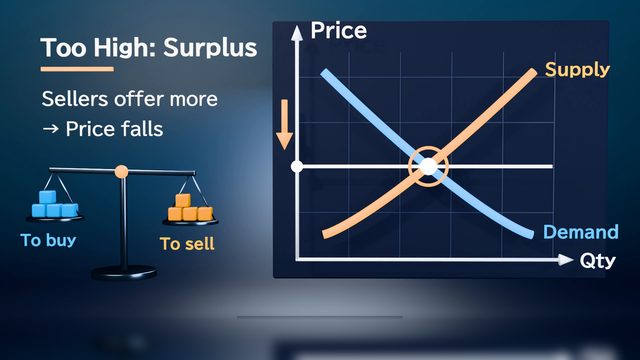
Figures such as sales trends, breakdowns, and headcount changes are shown as charts within scenes. Charts use only the figures in your documents. Always check the numbers and units in the finished video.
At briefings or on the web
Besides 16:9 for venue screens, you can also choose 9:16 or 1:1 for recruiting pages and social media. Choose a length from 15 seconds to 10 minutes. Videos are exported as 1080p MP4 files with narration, captions, and scene transitions.
Examples of videos you can make
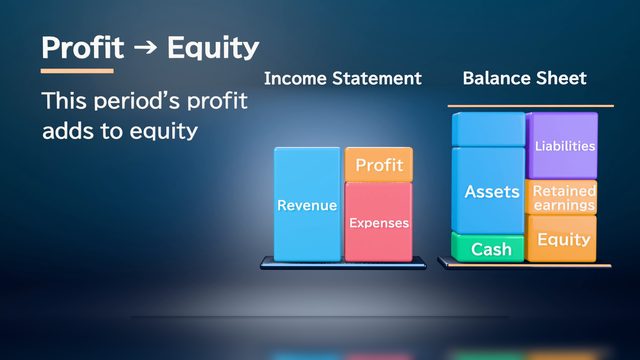
- Show how the three financial statements connect through the flow of money
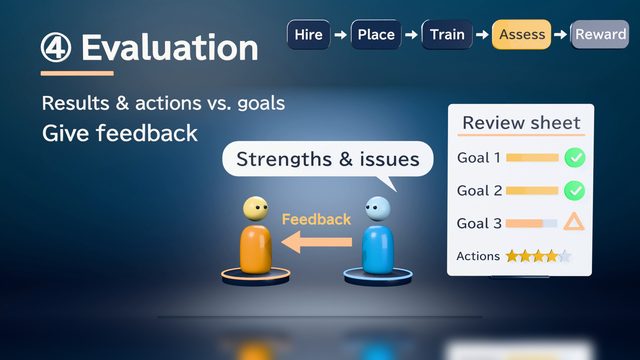
- Changes to the HR system, and the flow from evaluation to compensation
- The workflow from receiving an order to shipping and invoicing
- A 2-minute video to tell employees about the new expense reimbursement process
- Key points of the mid-term business plan, with a graph of the numerical targets
- For company briefings: how the business works and how it reaches customers
Sample videos similar to this use case
Tips for better results
When explaining a business or policy, start by showing "who is affected, what changes, and from when." Viewers will find it easier to see how it applies to them. If you have a lot to cover, we recommend limiting each video to one topic and building separate videos, such as what's changing, why, and the procedures. For numbers you want to turn into graphs, attach the original table as Excel or CSV. If a document contains personal information, such as employee names or evaluations, keep only the parts you need before attaching it. For videos meant for people outside your company, also check that the numbers are OK to make public.
Example chat requests
Using the attached business plan, create a 2-minute video to play at an internal briefing. First show the sales trends of 3 businesses in charts, then explain in order, with diagrams, the areas we'll focus on next fiscal year and why. Use the numbers exactly as they appear in the document.
Price estimates
In Standard mode, one 1-minute video with 2 small revisions costs about 3,500 credits (1 credit = $0.01). High Quality mode costs about 7,100 to 12,000 credits. There's no monthly fee, and before each run we show you an estimate and a cap on the credits to be used.
Typical costs of 3D explainer videos (compared with production companies) · Pricing
FAQ
Is 3D animation also a good fit for explaining a business or a policy?
Yes, it works well for this. Turning departments, clients, and the flow of money and goods into a 3D diagram lets you walk through even a complex web of relationships step by step. Check out the sample videos "How the three financial statements connect" and "From hiring to evaluation and development" to see how it looks.
Can I use it to explain legal matters or internal policies?
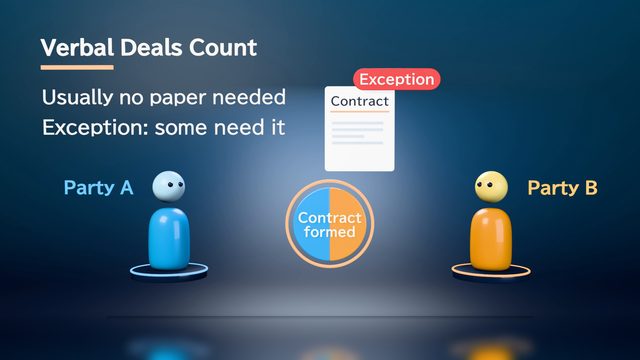
Yes. The AI aims to use only facts from your attached documents, but errors are possible. For content involving laws or regulations, have the responsible department check the storyboard and the finished video before you publish.
Can I attach documents that contain employees' personal information?
Keep attachments that contain personal information to the minimum needed. We recommend removing names, evaluations, and anything else the video doesn't need before you attach a file. Attached materials are not used for AI training, and materials and deliverables are deleted automatically after 30 days.
Can I make different versions of a video for internal and external audiences?
Yes. Change how you ask: for internal use, ask for the fine details of the policy; for external use, just the key points. Each is built from its own storyboard. For videos meant for people outside your company, attach only documents that contain information you can make public.
Make 3D animations about your business or policies from documents and chat
Just attach your materials and tell the AI in chat what video you want. The AI plans a storyboard, builds 3D visuals, and makes a video with narration and captions.